
How Jaipur E-commerce Businesses Can Automate Delivery Tracking

E-commerce businesses in Jaipur can automate delivery tracking, one of the most useful forms of e-commerce automation, by connecting their online store to their couriers' tracking systems, so buyers get updates on WhatsApp, SMS (text message) or email as the parcel moves, without staff looking up each order by hand. Rules and prices cited were checked in November 2026; the cost figures are assumptions for illustration.
Key Takeaways
- Start on the courier that carries most of your orders, and add stages only when buyers ask for them.
- Get WhatsApp templates approved and SMS sender IDs registered before the build starts.
- Switch on failed-delivery replies early: they act while the parcel is still with the courier, which is where returns to the seller are decided.
Why Manual Tracking Strains E-Commerce Teams
Rajasthan's One District One Product list names gems and jewellery as Jaipur district's primary product, with garments and furniture among its secondary products and block-printed items as the primary product of Jaipur (Rural) (Economic Review 2023-24). As sellers of these goods ship across India, tracking every parcel by hand becomes a job of its own.
The work is repetitive. Someone logs into each courier portal, copies the tracking number, known as the Air Waybill or AWB number, and answers the same "where is my order?" question by phone, chat and social media. With the information in several places, nobody notices a stuck parcel until the buyer calls.
What E-commerce Automation Changes for Jaipur Sellers
The gains show up in three places.
Fewer "Where Is My Order?" Questions
Updates at the moments buyers care about answer the question before it is asked, freeing support staff for sales questions.
Fewer Parcels Returned to the Seller
When a parcel cannot be delivered, the courier sends it back to the seller, a Return to Origin or RTO in courier terms, adding return freight and tying up stock.
Cash-on-delivery (COD) orders are the riskiest, because a buyer who has not yet paid can simply refuse the parcel. A morning-of-delivery message stating the amount due and offering a digital payment option tackles that risk before the courier arrives.
A Tracking Page on the Store's Own Site
A tracking page on the store's own site or app keeps the buyer with the brand instead of sending them to a courier's website, and can show care guides or related products; building one is typical App Development work.
How Delivery Tracking Automation Works
The set-up has three parts: the store, the couriers and the messaging channels. Connecting software, often called middleware, passes data between them through application programming interfaces (APIs), the links that let separate programs exchange data. This is a typical Business Automation workflow: instead of someone checking each parcel, the software sends a message or takes an action when the parcel reaches a new stage.
- Order received and checked: When the warehouse marks an order ready, the store passes the buyer's details, address and courier to the middleware, which checks the mobile number and PIN code (postal index number) and holds faulty orders for a staff member to fix before the label prints.
- Shipment booked: The middleware books the shipment through a courier aggregator, a service that connects one store to several couriers, or directly with the courier, and stores the AWB against the order. A repeated order number is ignored, so it triggers no second dispatch message.
- Status words mapped to common stages: One courier marks a parcel "In Transit", another "Hub Inward" and a third "Dispatched". The middleware maps them all to one set: Order Confirmed, Manifested (shipment details sent to the courier), Handled by Courier, Out for Delivery and Delivered, so one set of rules covers every courier. Logistics firms use the same mapping to combine carrier and warehouse feeds with AI agents.
- Only useful stages trigger messages: Dispatch, out for delivery, delivered, a delay or a failed attempt each send one message. Hub-to-hub transfers are recorded but not sent, because too many alerts teach buyers to ignore the one that matters.
- Update sent on the buyer's channel: The message goes by WhatsApp, SMS or a tracking-page link, with the expected delivery window where the channel allows. An undelivered WhatsApp message is resent by SMS.
- Every step logged: Status changes, messages and buyer replies are recorded against the order, and the case closes on delivery or return.
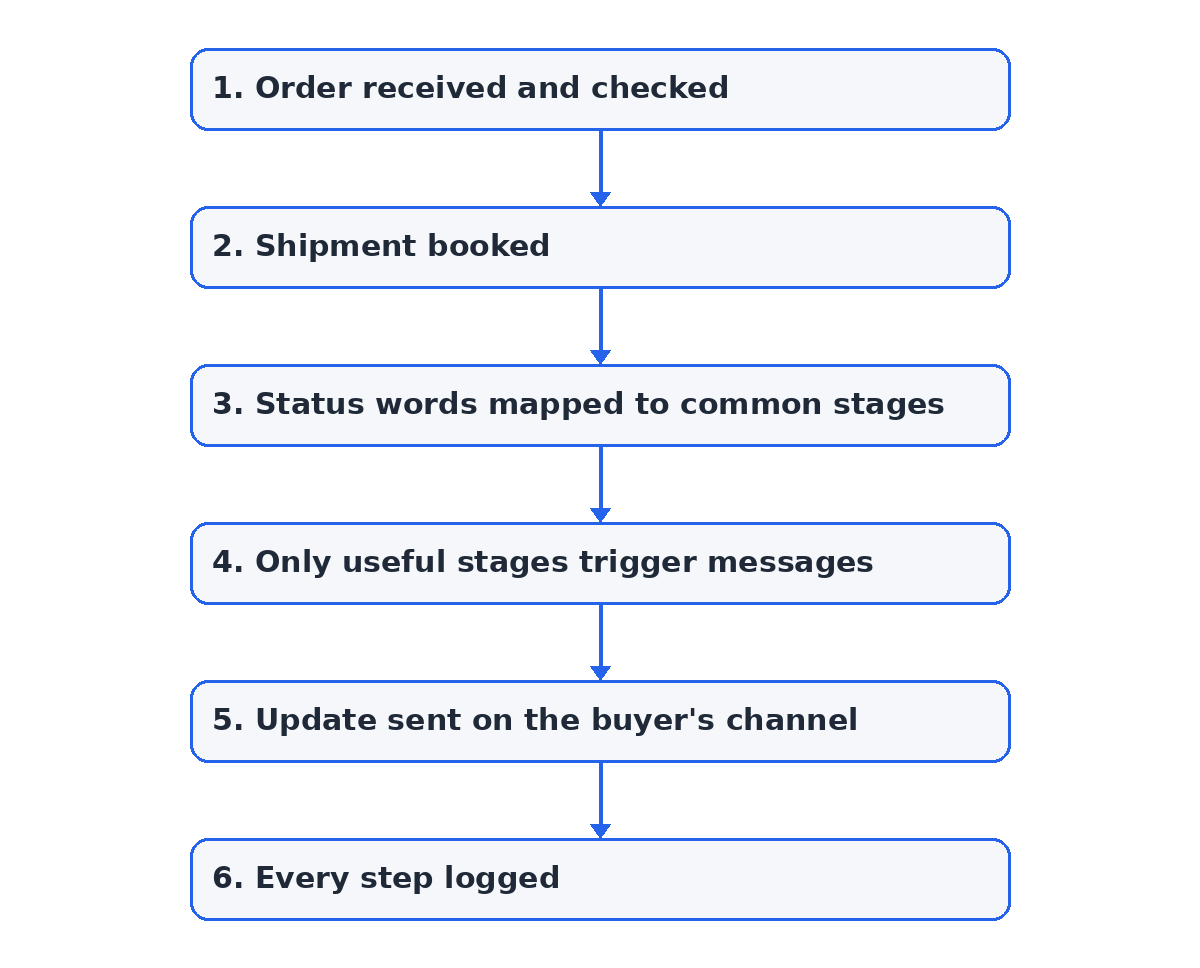 Figure: the 6 main steps, from order received and checked to every step logged.
Two exception paths sit outside this main chain:
- Failed attempts: When the courier logs a Non-Delivery Report (NDR), such as an incomplete address, the buyer not being home or no access at the gate, the buyer gets quick replies: "Reschedule Tomorrow", "Alternate Address", "Call Courier" or "Self-Pickup at Hub". Where the courier or aggregator accepts instructions through its API, the choice is passed back; the buyer is told the new date only after the courier's system confirms the new attempt, and otherwise "request sent, we will confirm". If the buyer does not reply within a time the business sets, the warehouse manager is alerted, and parcels still undelivered after the allowed re-attempts are flagged for return.
- Message and feed failures: On sale days the middleware is set to pace messages within the providers' limits and resend failures. If messages stop or a courier's feed goes quiet, a named person is alerted.
Messages from unknown numbers or unrelated to an order go to the support inbox. A payment dispute (such as a buyer who paid online but is asked for cash), a lost or damaged parcel, or a report of a fake payment-link message goes at once to a named staff member. Payment links come only from the verified WhatsApp number and point to the store's own domain, as the first alert tells the buyer.
| The automation handles | Needs a staff decision |
|---|---|
| Stage alerts, delivery windows and the SMS fallback | Refunds and cancellations |
| Failed-delivery options passed to the courier | Address changes after dispatch, especially COD or high-value orders |
| Marking COD as paid once the payment gateway confirms | COD disputes and suspected scams |
| Logging every status, message and reply | Lost or damaged parcel claims |
A hypothetical scenario (for illustration, not a client case): a Jaipur block-print seller ships a ₹1,800 cash-on-delivery order to a buyer in Pune. On the morning of delivery the buyer gets a WhatsApp reminder with the amount due and a payment link; had the buyer paid, the order would be marked paid and the courier told only after the payment gateway confirmed it. The first attempt fails at a locked gate, so the buyer taps "Reschedule Tomorrow"; the middleware passes the choice to the aggregator, and the buyer is told the new date once the aggregator's system has booked the second attempt.
The same workflow would differ by product (hypothetical examples):
- Jewellery: an insured parcel with no COD would add a one-time password (OTP) alert for handover at the door, with any delay sent straight to staff.
- Furniture: a multi-piece order would send one alert per piece and ask the buyer to pick a delivery slot that the courier then confirms.
- Garments: a size exchange would trigger a pickup alert for the old item and a dispatch alert for the new one.
Review how a Business Automation workflow connects your store, couriers and buyer messages before you choose which alerts to switch on first.
Comparing Channels for Delivery Updates
Use WhatsApp for alerts with reply buttons and SMS as the fallback, because SMS reaches basic phones without mobile data. Email and a tracking page suit detail on demand.
| Channel | Cost basis | What buyers can do | Limitations and set-up |
|---|---|---|---|
| WhatsApp Business Platform | Meta's charge per delivered message, by category | Tap reply buttons and see the delivery window | Needs Meta Business verification and approved message templates; buyers need mobile data |
| Transactional SMS | Per-message charge from the SMS provider | Read plain text and open a shortened link | No buttons; sender ID and templates must be registered before sending |
| The email-sending service's plan, usually priced by volume | Read formatted layouts and itemised invoices | Often read too late for a same-day alert; needs email authentication records on the sending domain | |
| Branded tracking page | Build and hosting cost as part of the store's site | Check status on demand and browse related products | Buyers must click through from another message; needs store integration |
Since 1 July 2025 Meta charges WhatsApp Business Platform messages per delivered message, by category (marketing, utility, authentication or service) (Meta).
Cost, Requirements and Setup Phases
For one store linked to an aggregator or two couriers, with alerts on two channels, plan on a one-off setup and integration cost of about ₹1,00,000 (assumed for this example, not a quote; scope, integrations and volumes change it). A worked example for a hypothetical seller shipping 3,000 orders a month:
- Messages (illustrative): 3,000 orders × 3 alerts = 9,000, plus an assumed 500 failed-delivery prompts, gives 9,500 WhatsApp utility messages; 9,500 × ₹0.115 = ₹1,093, as listed by Meta for November 2026; prices change (Meta). An assumed 500 SMS fallbacks × an assumed ₹0.30 = ₹150, so messages cost ₹1,093 + ₹150 = ₹1,243 a month. Replies to button taps are service messages, assumed to stay within the 1,000 free each month per business number.
- Running cost (illustrative): an assumed ₹3,500 hosting (a cloud server, database and monitoring) + ₹2,500 upkeep (an assumed 10 hours a month updating status mappings and templates) + ₹1,243 messages = ₹7,243 a month.
- Staff time (illustrative): if 300 orders (an assumed 10%) bring a "where is my order" contact taking 6 minutes, and alerts prevent half the contacts of the assumed 80% of buyers they reach, that is 300 × 80% × 50% = 120 contacts, or 12 hours (120 × 6 ÷ 60); at an assumed ₹250 an hour, the productivity value is ₹3,000 a month.
- Returns (illustrative): if 150 parcels come back each month after failed attempts, an assumed 40% of those buyers reply to the prompt (60) and half of those parcels are then delivered, 30 returns are saved; at an assumed ₹400 each in return freight and kept margin, that is ₹12,000 a month.
- Value-based payback (illustrative): ₹3,000 + ₹12,000 = ₹15,000 of monthly value; ₹15,000 − ₹7,243 running cost = ₹7,757 a month, so the ₹1,00,000 setup would be recovered in about 13 months (1,00,000 ÷ 7,757 = 12.9).
The assumed ₹3,000 of staff time becomes a cash saving only if staff hours, overtime or hiring actually fall. Counting only the assumed returns figure (₹12,000 − ₹7,243 = ₹4,757 a month), the illustrative payback stretches to about 21 months (1,00,000 ÷ 4,757 = 21.0). This is an illustration, not a result; use your own order, query and return figures.
What Drives the Cost
- Setup and integration work: a store platform with ready connectors and one aggregator need less work than a custom store and direct courier links.
- Usage charges: message charges, which grow with orders and with the stages that send a message.
- Maintenance: updating status mappings and templates, and watching the failure alerts.
Rajasthan's MSME Policy 2024, in force until 31 March 2029, offers micro, small and medium enterprises (MSMEs) that have adopted e-commerce since the policy was notified a one-time reimbursement of up to 75% (maximum ₹50,000) for software or equipment that digitises business processes. Check with the state Industries department whether your set-up qualifies.
What Must Be Ready
- Clean checkout data: valid mobile numbers only, and the address in separate fields (house, street, PIN code).
- Courier and store access: API access to each courier or the aggregator, and admin access to the store so it can pass on order updates.
- Messaging approvals: Meta Business verification and approved WhatsApp message templates. For SMS, under the Telecom Regulatory Authority of India's (TRAI's) rules, a business sending commercial SMS, delivery alerts included, must be registered with a telecom operator and use registered sender IDs and message templates, which are recorded on the operators' Distributed Ledger Technology (DLT) platforms (TCCCPR 2018), so complete that registration before the first alert goes out.
- People: a named person who receives failed-delivery and system alerts, and someone who owns the message wording.
Setup Phases
As planning estimates: a basic deployment (a ready store connector, one aggregator and three alerts) typically takes 3-4 weeks before a live pilot on one courier. Deeper integration (direct courier APIs, a custom store, enterprise resource planning (ERP) or warehouse software, failed-delivery write-back and a branded tracking page) adds about 3-6 weeks, depending on each courier's API. Pending template or DLT approval and messy address data make either longer.
If the Tracking System Goes Down
Plan a manual fallback. If a connection or the tracking software stops, staff work in the courier portals, keep a sheet of orders and tracking numbers, and post a notice on the tracking page. Once the system is back, they enter the missing tracking numbers so updates resume without duplicate alerts.
Customer Privacy and Data Protection in Delivery Workflows
Delivery alerts handle customers' names, addresses and phone numbers, so the Digital Personal Data Protection (DPDP) Act, 2023 governs them: from May 2027, the data must be used for the purpose it was given for and protected with reasonable security safeguards. The DPDP Rules, 2025 were notified on 13 November 2025, and most duties apply from May 2027.
Until then, the Information Technology Act, 2000 still applies, including its Section 43A, which the DPDP Act removes only from 13 May 2027 (DPDP Act, Section 44(2), India Code). Confirm your obligations with a legal adviser.
In practice, pass couriers only the details needed to deliver, limit and log staff access, encrypt data in transit and at rest, and keep names and payment details out of tracking links.
Notice and opt-in. Before the buyer places the order, checkout shows a short notice in English and Hindi: what is collected, why, who sees it (the courier and messaging providers) and a link to the privacy notice, with an unticked opt-in box naming the WhatsApp updates sent. The consent time is stored with the order. A buyer can reply STOP, or tap "Stop alerts", at any time; messages then stop and the tracking page still works.
Retention. Keep tax records under goods and services tax (GST) law apart from working data. GST records must be kept for 72 months from the due date of the annual return for the year (CGST Act, Section 36). Message logs, failed-delivery replies and tracking-page data are set by the business and stated, for example deleted 90 days after delivery or return (a recommendation, not a legal period).
With WhatsApp's Cloud API, Meta hosts and processes messages on its servers as a data processor for the business; messages at rest are encrypted and kept for up to 30 days (Meta).
Where to Start with Delivery Tracking Automation
The practical first step for a Jaipur seller is a short audit of last month's orders as the baseline: which couriers carried them, how many "where is my order" queries arrived, the staff minutes spent on them and how many parcels came back. E-commerce automation can then be piloted on the courier that carries the most orders and measured against that baseline: queries per hundred orders and the reply time on those still arriving, orders delivered after a failed attempt, the return-to-origin rate, staff minutes on tracking contacts, the SMS fallback rate and the share of cases escalated to staff. Those figures show quickly whether it pays.
Frequently Asked Questions
Will it work with the store platform and couriers we already use?
Usually yes, if the store can notify other software when an order is ready and each courier or your aggregator shares tracking data. A custom-built store without ready connectors needs some development first.
Can alerts go out in Hindi as well as English?
Yes. Write each template in both languages and get each version approved, then let buyers pick a language at checkout. Keep the two versions identical in meaning, including the amount due on cash-on-delivery orders.
What happens to our order and message data if we stop?
Your store and courier accounts stay yours, so staff can go back to the courier portals the same day. Write into the contract that the order history and message logs are handed over in a standard file format and that copies held by the tracking software are then deleted.
How Tech Pro Solutions Can Help with Delivery Updates
Tech Pro Solutions builds Business Automation workflows that connect online stores, courier systems and customer messaging: courier connections, status mapping, message templates and their submission for approval, failed-delivery replies and staff alert rules, tested on sample orders before any buyer gets a message. Where the store needs a branded tracking page, the App Development team builds that part. A four-week plan (a planning estimate): week 1, audit last month's orders and returns; week 2, connect the aggregator and three alert templates; week 3, run test orders; week 4, go live on your busiest courier with a first report against the baseline.
Request a cost estimate from Tech Pro Solutions for your store and couriers, and we will map your order flow and demonstrate the alerts on sample orders from your store.

About the author
Aniket Kumar · AIML EngineerAniket Kumar works on AI/ML at Tech Pro Solutions, with skills in Python, PyTorch, SQL, LangChain and LangGraph. His LinkedIn profile lists a B.Tech in Computer Science at the University of Engineering & Management (2021–2025).
Comments (0)